 Recent Posts
1
Information / Re: Possible CWP Security Issue – Malicious JavaScript Injection
« Last post by Starburst on Today at 12:49:23 PM »@murad99
Is there a reason you are still running CentOS 7, a past EOL OS?
That alone is a massive security hole.
The past several weeks they have been Kernel updates almost every other day, at least for AL9 and AL10.
But to close some of the security holes, I would updated your:
Base PHP to at least 8.3.33 and the PHP-FPM for the websites. (I'm glad CWP finally got PHP updated)
Apache is at 2.4.68
Nginx is at 1.30.4
jQuery has several notable past Common Vulnerabilities and Exposures (CVEs) related to Cross-Site Scripting (XSS) and DOM manipulation.
(There are 137 entries just for jQuery)
That's not counting the CVE's for CentOS 7, Apache <2.4.68, Nginx <1.30 and PHP <8.3.33
Our AlmaLinux 9 servers are all OK.
But we try to keep everything updated on the server side, unfortunately that doesn't work with some users. :/
Is there a reason you are still running CentOS 7, a past EOL OS?
That alone is a massive security hole.
The past several weeks they have been Kernel updates almost every other day, at least for AL9 and AL10.
But to close some of the security holes, I would updated your:
Base PHP to at least 8.3.33 and the PHP-FPM for the websites. (I'm glad CWP finally got PHP updated)
Apache is at 2.4.68
Nginx is at 1.30.4
jQuery has several notable past Common Vulnerabilities and Exposures (CVEs) related to Cross-Site Scripting (XSS) and DOM manipulation.
(There are 137 entries just for jQuery)
That's not counting the CVE's for CentOS 7, Apache <2.4.68, Nginx <1.30 and PHP <8.3.33
Our AlmaLinux 9 servers are all OK.
But we try to keep everything updated on the server side, unfortunately that doesn't work with some users. :/
2
Updates / Re: Cannot Install PHP-FPM on Alma 8 & 9
« Last post by Jack_C on Today at 11:35:28 AM »PHP-FPM works fine on our AL9 ( AlmaLinux 9.8 ) and CWP 1.7 directly from the GUI.
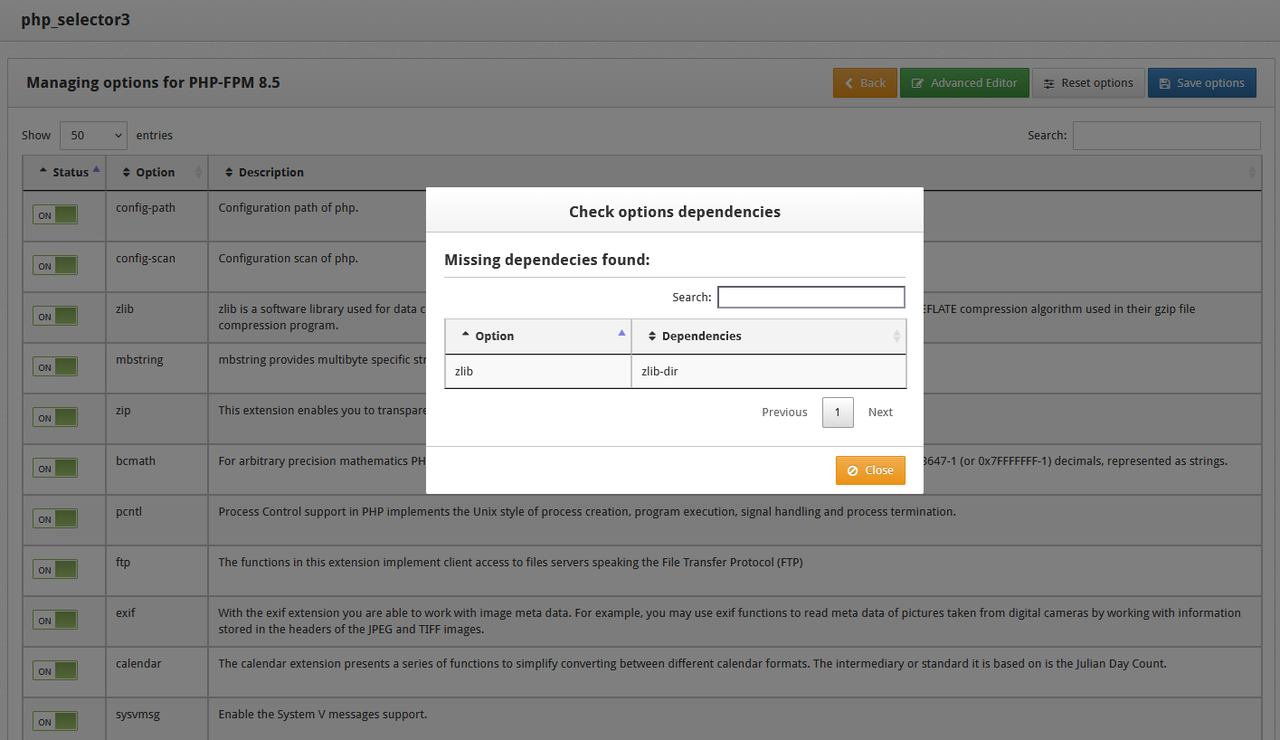
Ok mate, but there are people still using AlmaLinux 8.10 and have an error message when trying to install PHP-FPM 8.4 or PHP 8.5.
I have tried all the available solutions but none of them work for me. Do you have any idea how we who use AlmaLinux 8.10 can fix it?
Thanks
Image attached
3
PHP / Re: PHP-FPM Won't install zlib says missing dependency zlib-dir
« Last post by kandalf on Today at 08:29:58 AM »Any solution for this?
I cant even save the /usr/local/cwpsrv/htdocs/resources/conf/el8/php-fpm_selector/8.4.ini in advance editor because I get "Error
Unknown error occurred."
I change it via ftp but inside the panel don't work.
CWP team are using AI and are working in a better pace in the last weeks but they need to add tests to the system to stop breaking things. AI is amazing but we need to know how to work with it
I cant even save the /usr/local/cwpsrv/htdocs/resources/conf/el8/php-fpm_selector/8.4.ini in advance editor because I get "Error
Unknown error occurred."
I change it via ftp but inside the panel don't work.
CWP team are using AI and are working in a better pace in the last weeks but they need to add tests to the system to stop breaking things. AI is amazing but we need to know how to work with it
4
DNS Manager / "Whats the most spontaneous thing youve ever done with someone you just met?".
« Last post by riendsca on Today at 04:08:00 AM »Ever bumped into someone who turned a boring day into an adventureor something way more interesting?
PrivateLadyEscorts.com
Sexy girls for tonight
PrivateLadyEscorts.com
Sexy girls for tonight
5
Information / Re: Possible CWP Security Issue – Malicious JavaScript Injection
« Last post by overseer on Today at 03:33:35 AM »The access_log was over 3 gbs in size.My advice:
...
Is it safe to delete these two periodically on my own?
Code: [Select]
truncate -s0 /usr/local/cwpsrv/logs/access_log
truncate -s0 /usr/local/cwpsrv/logs/error_log
Then look at File Management > Logrotate Manager and add a rotation job for those files.6
PHP / Re: PHP-FPM Won't install zlib says missing dependency zlib-dir
« Last post by kadybee on Today at 02:15:38 AM »NO. If I go to PHP-FPM selector and try to edit what it installs it throws the zlib-dir dependency error even if I change nothing and LEAVE (it's already selected) zlib enabled and just hit "Save Options." There has been no fix pushed by CWP. So I can't build PHP-FPM 8.4 as I need other custom options enabled.
In the PHP-FPM Selector, select MANAGE OPTIONS of the version you are wanting to install and de-select the zlib option - then select any others you may want - and Save.
EDIT: spoke too soon as PHP-FPM 8.5 installed after the above yet won't start due to "Unable to start pcre module" Will need to investigate the reinstall etc of that module to ensure it doesn't effect the earlier running version.
7
Information / Re: Possible CWP Security Issue – Malicious JavaScript Injection
« Last post by murad99 on August 25, 2026, 09:52:12 PM »Which PHP version are you running? What do you have for disable_functions in the relevant php.ini file?
I am running PHP 8.3.21 for the affected websites.
The disable_functions setting in the relevant php.ini is:
disable_functions = exec,passthru,shell_exec,system,proc_open,popen,pcntl_exec
These functions are currently disabled.
8
Information / Re: Possible CWP Security Issue – Malicious JavaScript Injection
« Last post by murad99 on August 25, 2026, 09:40:11 PM »Please advise the following:
What distro are you running CWP on?
What web server are you using? Apache or Nginx?
The version of web server?
What PHP version?
Was the affected site using WordPress?
If so, what version?
Sure, here are the details:
1. Operating System:
CentOS 7
2. Web Server:
Nginx & Apache
Additional Options:
php-cgi/suPHP, nginx/php-fpm, apache/php-fpm, proxy
3. Web Server Versions:
Apache 2.4.57
suPHP 0.7.2
Nginx 1.26.1
4. PHP Version:
The default PHP version is 7.4.33, but all websites are running PHP 8.3.21.
5. Affected Websites:
There are approximately 20 websites on this server.
The affected websites included:
* 2 WordPress websites
* 1 HTML website
* 5 custom-built websites
* Several subdomains
So this was not limited to WordPress websites.
6. WordPress Versions:
The two affected WordPress installations were:
* WordPress 6.8.8 — updated on August 12 at 17:52:28
* WordPress 6.9.7 — updated on August 12 at 19:19:48
For comparison, the following WordPress installations on the same server were not affected:
* WordPress 7.0.4 — updated on August 12 at 18:03:26
* WordPress 7.0.4 — updated on August 12 at 18:39:09
* WordPress 7.1 — updated on August 20 at 02:52:42
* WordPress 7.1 — updated on August 20 at 12:19:19
* WordPress 7.1 — updated on August 24 at 10:26:25
The malicious modifications were observed on August 13, while the affected WordPress installations had already been updated on August 12.
Also, since non-WordPress and custom websites were affected as well, I believe there may be another common attack vector involved.
One additional point: this is a private server and nobody other than myself has access to it.
I also noticed that the modification timestamps of the affected files were identical. This was not limited to the jQuery files of a single website; the jQuery files across the other affected websites had the same modification time as well. This makes me suspect that the modification may have been triggered from a single point and then propagated to other websites.
The WordPress installations initially looked suspicious, but the other affected websites use completely different custom infrastructures, and some of them do not even have an administrative panel. Therefore, it would not be possible to inject the code through those websites themselves.
I would also like to ask other CWP users, especially those running AlmaLinux 9 with all current updates, to check their jQuery files for the same injection. If this is a CWP-related issue, checking different operating systems and fully updated CWP installations may help identify the common attack vector.
9
Information / Re: Possible CWP Security Issue – Malicious JavaScript Injection
« Last post by audept on August 25, 2026, 09:39:18 PM »Looking for advice here:
When I looked at these two cwp server logfiles:
/usr/local/cwpsrv/logs/access_log*
/usr/local/cwpsrv/logs/error_log*
The access_log was over 3 gbs in size.
I scanned through these and saw no malicious offenders...I keep th cwp browser open all the time and I could see periodic updates into the file.
Looks like these have grown over the years, and it appears that they are on no log rotation.
Is it safe to delete these two periodically on my own?
When I looked at these two cwp server logfiles:
/usr/local/cwpsrv/logs/access_log*
/usr/local/cwpsrv/logs/error_log*
The access_log was over 3 gbs in size.
I scanned through these and saw no malicious offenders...I keep th cwp browser open all the time and I could see periodic updates into the file.
Looks like these have grown over the years, and it appears that they are on no log rotation.
Is it safe to delete these two periodically on my own?
10
Information / Re: Possible CWP Security Issue – Malicious JavaScript Injection
« Last post by Starburst on August 25, 2026, 03:14:00 PM »Please advise the following:
What distro are you running CWP on?
What web server are you using? Apache or Nginx?
The version of web server?
What PHP version?
Was the affected site using WordPress?
If so, what version?
What distro are you running CWP on?
What web server are you using? Apache or Nginx?
The version of web server?
What PHP version?
Was the affected site using WordPress?
If so, what version?
